“Stuck in Undeploying.” “Stuck in Pending.” “Stuck in Terminating.” Over a year, that word showed up in more than a hundred tickets on a platform that deploys models onto GPU clusters. The states were different; the shape of the problem was the same every time.
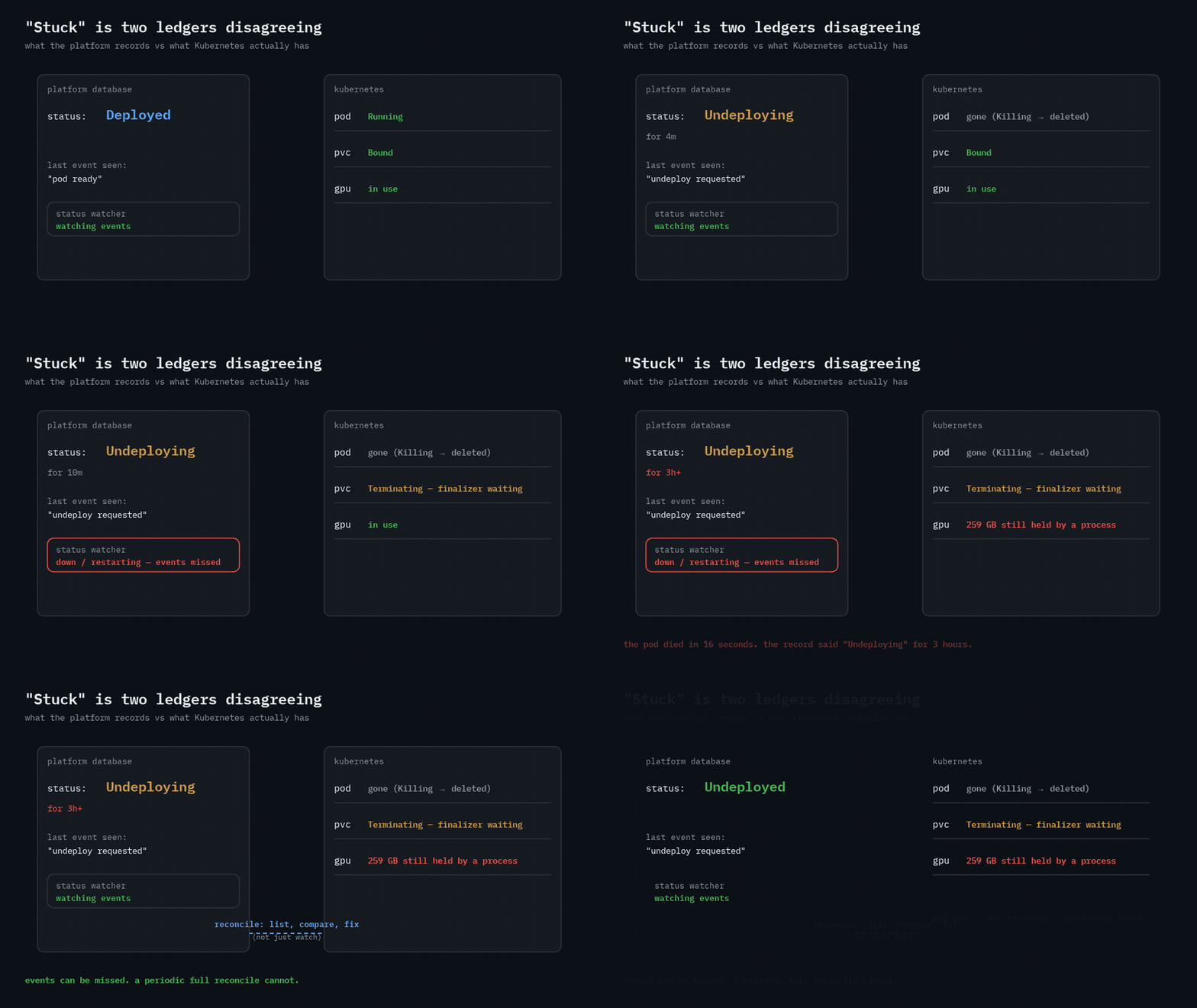
A platform keeps its own record of what a workload is doing. Kubernetes keeps the truth. “Stuck” is the gap between them.
Six ways the gap opens
1. The watcher missed the event. The most common one. A status updater watched Kubernetes events and wrote the platform record. Undeploy requested, pod killed in 16 seconds — and the record said “Undeploying” three hours later, because the updater was restarting when the delete event fired. It never came back. Fix: a warm-up period after start and a full refresh once the cache is ready. Real fix: reconcile on a timer — list what exists, compare with what you recorded, correct the record. Watches are fast; lists are complete. You need both.
2. A state that was not in the enum. Stopping a fine-tuning run moved it to TERMINATING, then a background worker tried to move it to CANCELLED and threw — the entity’s state list had no TERMINATING. The exception died quietly in the worker; the run stayed TERMINATING. The fix was one line: add the state. The lesson is bigger: an unknown state in a worker must be loud, or it becomes a permanent state.
3. A file lock on network storage. Deployments Pending forever. The init container that downloads weights took a flock() on the shared volume to avoid two pods downloading the same model — and on that NFS backend the call failed with OSError: [Errno 37] No locks available. The download never started; the pod never became ready; nothing timed out. Two fixes over time: first, move the lock file off the network volume; later, replace file locks with Kubernetes Leases entirely. Byte-range locks on NFS are a lie you only find out about in production.
4. The pod is gone, the resources are not. Undeploy deletes the pod and waits. Twice the wait never ended: once a PVC sat in Terminating behind a finalizer, and the deployment only cleared after the volume was deleted by hand; once two GPUs stayed “unusable” after undeploy — one still reporting 259 GB held by a process that had outlived its container. Freeing the pod does not free the GPU. Undeploy has to check the volume and the device, not just the pod.
5. Concurrency on a unique key. Re-importing a model into a volume created a second import workload; a unique index on the import record rejected it, and the workload sat Pending with nothing to run. A concurrency guard was added, reverted (it broke something else), and the final fix was to drop the unique index and allow multiple imports. Uniqueness constraints are a poor substitute for idempotency keys when the thing they guard can legitimately repeat.
6. Not stuck — waiting, with no state for it. A “Deploying” model that was really Pending on GPU capacity. A benchmark “releasing resources” that took 20 minutes — correct, just slow. A notebook still “Running” after its GPU node was pulled, returning 503 on every click. None of these were bugs in the mechanism; they were bugs in vocabulary. The fix each time was a state: Pending: waiting for GPU, Starting, with the events that explain why.
The pattern underneath
graph LR
    K["kubernetes<br/>(truth)"] -- "watch: events" --> U["status updater"]
    K -- "list: everything, every N min" --> R["reconciler"]
    U --> D["platform record"]
    R --> D
    D --> UI["what the user sees"]
    style R fill:#3fb95022,stroke:#3fb950
Events tell you something changed. Only a list tells you what is true now. Every stuck state in the first four causes would have self-healed within one reconcile interval. The updater is the fast path; the reconciler is the one you cannot skip.
How I debug a stuck workload now
- Pull both ledgers. The platform record for the workload, and
kubectl getfor every object it owns: pod, service, PVC, and the GPU on the node. - Find the first disagreement. Pod gone but record says Undeploying → cause 1 or 2. Pod Pending with an init container that never logs → cause 3. Pod gone, PVC Terminating → cause 4. Record Pending, no pod at all → cause 5.
- Check the watcher’s uptime against the timestamp of the last event in the record. If they overlap, you have your answer.
- Fix the record last. Editing the status by hand without clearing the Kubernetes side just moves the problem to the next deploy.
What I would do differently
- Ship the reconciler on day one, not after the third stuck ticket. Watch-only status updaters are a debt that is invoiced in the middle of the night.
- Make “waiting for capacity” a first-class state with the reason attached. Half the “stuck” tickets were users staring at a word that did not tell them anything.
- Never take a file lock on a network volume. Use a Lease, or a row in the database with an expiry.
- Treat undeploy as done only when the pod, the volume and the GPU memory are all released — and expose which one you are waiting on.